


Pocket Casts - Podcast App
4.819.95K Reviews
App Specs
- Version
- Varies with Device
- Updated On
- License
- Free
- Downloads
- 1,000,000+
- Developer
- Automattic, Inc
- Categories
- News & Magazines
- Platform
- Android, iOS
Screenshots

 Analysis by AppCompare
I judge a podcast app less by how many shows it can point me toward than by what happens when I’m trying to listen in real life: while commuting, moving between devices, or dealing with a patchy connection. Pocket Casts is built around finding and organizing shows, and that focus makes it appealing if your subscriptions are becoming hard to manage. It’s a free News & Magazines app from Automattic, Inc, with a 4.8 average from around 113,000 ratings and over a million installs. The Teen age rating is worth noting for families, while optional in-app purchases range from $3.99 to $99.99 per item.
When a connection changes the listening routine
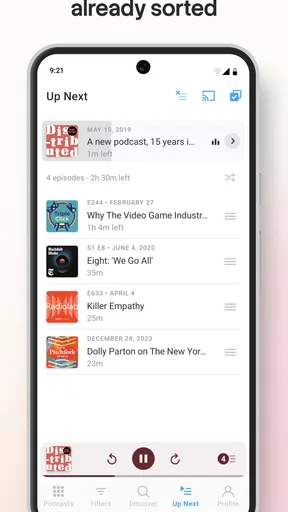
Browsing and searching are most useful when your connection is steady: that’s when I’d explore a new show, compare options, and decide what to follow. A commute or a crowded public connection is a different situation. Instead of making discovery the last thing I do before pressing play, I’d sort out the next episode while I have time and a dependable connection. That small change makes the app feel more like a prepared listening queue than a tool I have to keep consulting on the move.
Streaming suits a quick listen when I’m already connected and don’t need to plan ahead. It is less dependable as a routine if the route includes dead spots or I’m trying to keep mobile data use predictable. I’d treat the connection as part of the decision: browse and choose first, then decide whether to listen right away or prepare episodes for later. The app’s appeal is not that every listening situation is identical, but that its organization can help me move between them.
Choosing episodes for different mobile contexts
For a short walk, I might pick one episode and keep the task simple. For a longer trip, a playlist is more useful because it reduces the need to handle the phone repeatedly. At home, I can browse more deliberately; outside, I’d rather have a clear next choice ready. Separating those habits helps avoid the familiar problem of opening a podcast app with no idea what to play and spending the whole break searching.
A practical routine is to check the queue before leaving, especially if I expect to be away from reliable Wi-Fi. I can use a quiet moment to choose something that fits the trip rather than relying on a search screen loading at the wrong time. If I listen across devices, sync can make a handoff convenient, but I would still check that the episode and playback position are where I expect before relying on a second device in a hurry. A useful feature only feels seamless when the connection has had time to catch up.
Recovering from interruptions without losing the thread
Podcast listening often happens in fragments: a call comes in, a train gets noisy, or I reach a place where reception drops. Playback speed and silence trimming can make an episode shorter, but they don’t remove the need to find my place after an interruption. I find it helps to use the app’s queue intentionally instead of treating every episode as something I’ll remember to return to later. A small, curated set is easier to resume than a long pile of possibilities.
When switching between phone and tablet, I’d give syncing a moment rather than immediately starting the same episode on both. That is a sensible habit for any cloud-linked listening setup: confirm the current position, then continue. If a connection stalls, I’d first distinguish between a problem with the stream and a broader connection issue before repeatedly tapping play. Repeated attempts can add frustration without making reception any better. For listening where interruptions are likely, choosing an episode in advance is the more reliable move.
Worth Reading Before You Choose

Flipboard Shows What News Apps Must Do Beyond the Feed

Switching to Android Auto Means Rethinking Your Driving Routine

Google Calendar Makes a Crowded Week Easier to Manage

Ludo King Makes the Most of the Minutes Between Plans

Baby Panda World Brings Quick Play to Modern Phones, but Its Game Library Feels Busy

ESPN’s Live Game View Makes Following Close Games Easier
Keeping mobile data and storage in balance
Data-conscious listening is partly about choosing when to stream and partly about not keeping more audio than I need. I’d use a trusted Wi-Fi connection for preparation when possible, then keep my active queue focused on the episodes I actually expect to hear. Automatic downloads are convenient if I want new episodes ready without checking manually, but they also ask me to think about how quickly my listening habits and available storage change. A setting that works during a quiet week may be less suitable when I’m following several shows at once.
Automatic deletion can help prevent finished episodes from accumulating, but I wouldn’t assume every downloaded episode is disposable the moment playback ends. If I’m partway through a long conversation or want to revisit a useful segment, I’d check my listening state before relying on cleanup to keep things tidy. The best balance is personal: frequent listeners may value a fresh queue, while someone who listens irregularly may prefer more control over what stays on the device. Either way, a quick review of downloads is more useful than letting storage become a surprise.
Getting Started with Pocket Casts
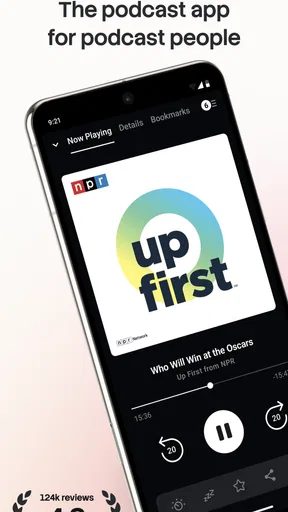
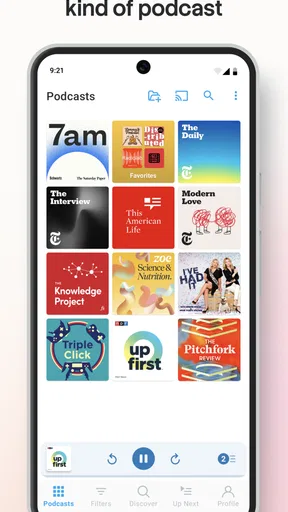
The first thing you notice when you fire up Pocket Casts is its sleek and intuitive design. Whether you're on Android or iOS, the app just feels right. Setup is a breeze. You can quickly sign up with your email or use existing accounts like Google or Apple for a seamless experience. The app syncs across devices, which means you can start on your phone and pick up right where you left off on your tablet or desktop. Talk about convenience!
Discovering New Podcasts
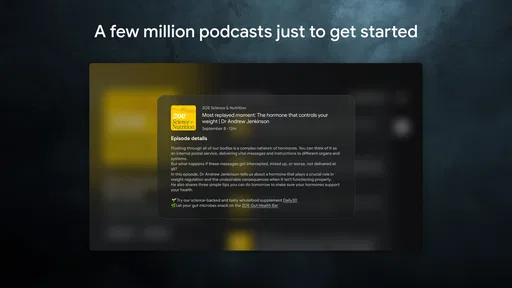
Now, let's talk about one of the best things about Pocket Casts—discoverability. The app offers a vast library with tons of categories, from comedy to education, news, true crime, and more. You can browse by trending shows, search by keywords, or even explore curated lists. It's like having a personal podcast concierge.
If you're indecisive like me, the "Discover" section will become your best friend. It's packed with recommendations, and you can even see what's popular in different countries. So, whether you're looking for something new or want to see what the world is listening to, Pocket Casts has got you covered.
Customizing Your Listening Experience
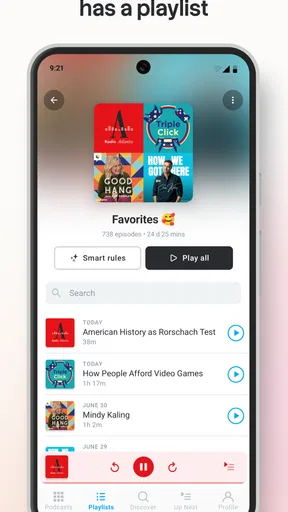
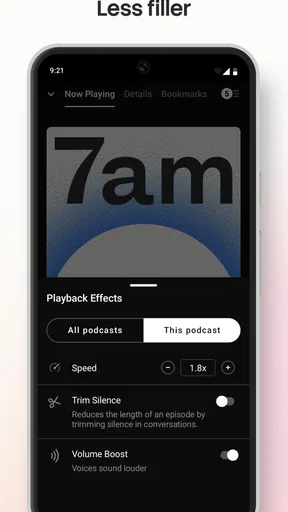
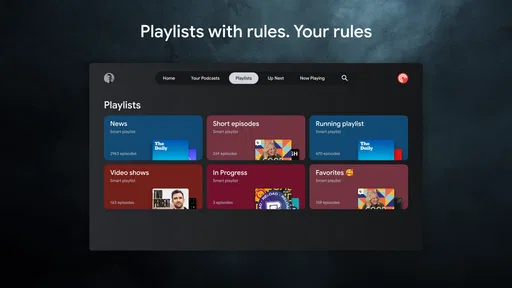
One of my favorite features is the level of customization. You can create playlists, adjust playback speed, and even set sleep timers. The app also remembers your preferences for each show, so if you like one podcast at 1.5x speed and another at normal speed, Pocket Casts will make it happen without you lifting a finger.
And let's not forget the "Trim Silence" feature, which is a game-changer. It automatically skips any awkward pauses, making your listening experience smooth and efficient. If you're someone who loves multitasking, this feature is a godsend.
Organizing a queue that fits the day
Playlists become more useful when I give each one a job rather than treating them as one giant backlog. I might keep a few episodes for a walk separate from longer shows I want for a quiet evening. That makes choosing easier, and it gives me a quick way to spot when the queue no longer reflects what I actually want to hear. A playlist is not just storage; it is a decision made before I’m distracted or in a hurry.
Playback speed is another setting I’d adjust with the content in mind. A familiar chat show may still sound natural at a faster pace, while a dense interview or news discussion can become harder to follow if I rush it. Since preferences can be remembered per show, I don’t have to choose one speed for everything. That is a genuinely useful convenience for listeners whose subscriptions include very different formats.
Offline Listening and Data Management
For those who are always on the go, offline listening is a must. Pocket Casts allows you to download episodes for offline playback, so you can enjoy your shows without worrying about data usage or spotty connections. Plus, the app offers automatic downloads for new episodes of your subscribed shows, ensuring you never miss out.
The storage management is also top-notch. You can set the app to automatically delete episodes after you've listened to them, which helps keep your device clutter-free. No more running out of storage space just because you're a podcast addict!
Cross-Platform Sync and Accessibility
One of the standout features is the cross-platform sync. Whether you're using an Android phone, an iOS tablet, or even a web browser, Pocket Casts keeps everything in sync. Your subscriptions, playlists, and listening history follow you everywhere. It's like having your personal podcast universe in your pocket.
Accessibility is another area where Pocket Casts shines. With features like VoiceOver and TalkBack support, the app is designed to be user-friendly for everyone. This inclusivity means more people can enjoy podcasts in a way that's convenient for them.
Where this player fits among the alternatives
If I mainly listen to a few shows and already use a general music or media app, switching may not be worth the extra setup. Those apps can be simpler when I want one familiar place for several kinds of audio. Pocket Casts makes more sense when podcasts are a regular part of my week and I want subscriptions, episode choices, and playback habits gathered in one dedicated place. Its discovery tools also give it an advantage over a basic player that only handles shows I already know.
There is a trade-off: more ways to organize listening can mean more decisions to maintain. Someone who prefers an app to choose a continuous stream for them may find manual browsing and queue management less appealing. I’d also keep the cost in perspective. The app is free to start, but in-app purchases are available, so I would check the current purchase details in the app before deciding whether any paid option suits my needs. A listener who wants only the simplest possible play button may be happier with a more minimal alternative.
Final Thoughts
At the end of the day, Pocket Casts is more than just a podcast player; it's a full-fledged platform that enhances how you discover, organize, and enjoy audio content. Its combination of a user-friendly interface, extensive customization options, and robust features make it a top choice for anyone serious about their podcasts.
If you haven't tried Pocket Casts yet, give it a go. Whether you're a podcast newbie or a seasoned listener, this app is designed to make your life easier and your listening experience richer. Happy listening!
Who I’d recommend it to—and who should pass
I’d recommend it to someone following several shows who wants a clearer way to choose what comes next, especially if listening shifts between home, errands, and travel. A realistic routine might be checking new episodes over breakfast, adding one to a short playlist, and then listening during a walk without needing to rediscover it later. A listener who values different speeds for different programs, or who likes keeping finished episodes from piling up, has more reason to use a dedicated podcast app than a general audio player.
I’d be less enthusiastic for someone who rarely listens to podcasts, dislikes managing subscriptions, or expects every step to work equally well without an internet connection. Discovery and syncing depend on network access at the moments they’re used, so planning ahead matters. If the phone is nearly full, automatic downloads may also need attention rather than being left alone. My practical verdict is that Pocket Casts works best when I use its organization to reduce last-minute decisions; it is not a substitute for a stable connection or a reason to download more episodes than I can reasonably hear.
Pros
- Intuitive interface makes navigation easy.
- Customizable playback speed options.
- Cross-device syncing is seamless.
- Extensive podcast library available.
- Offline listening for data savings.
Cons
- Limited free version features.
- Occasional sync delays reported.
- Ads in the free version.
- No video podcast support.
- In-app purchases for full features.
FAQs for Pocket Casts - Podcast App
What features does Pocket Casts offer for podcast management?
Pocket Casts provides a comprehensive suite of features for podcast enthusiasts, including customizable playlists, variable playback speeds, and a robust search function. Users can organize their favorite podcasts with ease, set up automatic downloads, and access curated recommendations, making it an ideal choice for both casual listeners and podcast aficionados.
Is Pocket Casts available on both Android and iOS platforms?
Yes, Pocket Casts is available for both Android and iOS devices. The app ensures a seamless experience across platforms, allowing users to sync their data and listen to their favorite podcasts on multiple devices without any hassle. This cross-platform availability enhances accessibility and convenience.
Does Pocket Casts offer offline listening?
Pocket Casts supports offline listening by allowing users to download episodes directly to their devices. This feature is particularly useful for those who travel frequently or have limited internet access, ensuring that users can enjoy their favorite podcasts anytime, anywhere without needing a continuous internet connection.
Are there any subscription costs or in-app purchases in Pocket Casts?
Pocket Casts offers both free and premium versions. While the basic app is free, the Pocket Casts Plus subscription provides additional features such as desktop apps, cloud storage, and exclusive themes. Users can choose according to their needs, with the premium option enhancing the overall user experience.
How user-friendly is the Pocket Casts interface for new users?
The Pocket Casts interface is designed with user-friendliness in mind, featuring a clean and intuitive layout. New users will find it easy to navigate through the app, with straightforward controls and helpful tutorials. The app's design ensures that even those new to podcast listening can quickly become comfortable with its features.


